
AI + Custom Software for Fire Protection
The fire inspection report isn't done until the AHJ accepts it.
Your technicians already inspect with a fire inspection app on a tablet, and your fire inspection software handles the checklist, the photos, and the schedule. The hours go to what happens after the tech leaves the building.
An office coordinator rereads each report before it goes to the jurisdiction’s portal. A service manager retypes deficiencies into proposals. Someone remembers which town wants which form. We build fire inspection report software for that layer: reports checked before submission, deficiencies drafted into proposals, and jurisdiction rules kept in one place.
We work around the inspection platform your techs already use. Your coordinators and service managers spend their time on customers and repairs instead of rereading reports.

Common inspection problems
Common AI and automation opportunities in fire & life safety
The inspection is the part your software already handles. The paperwork after it, from submission to the repair quote, usually isn’t.
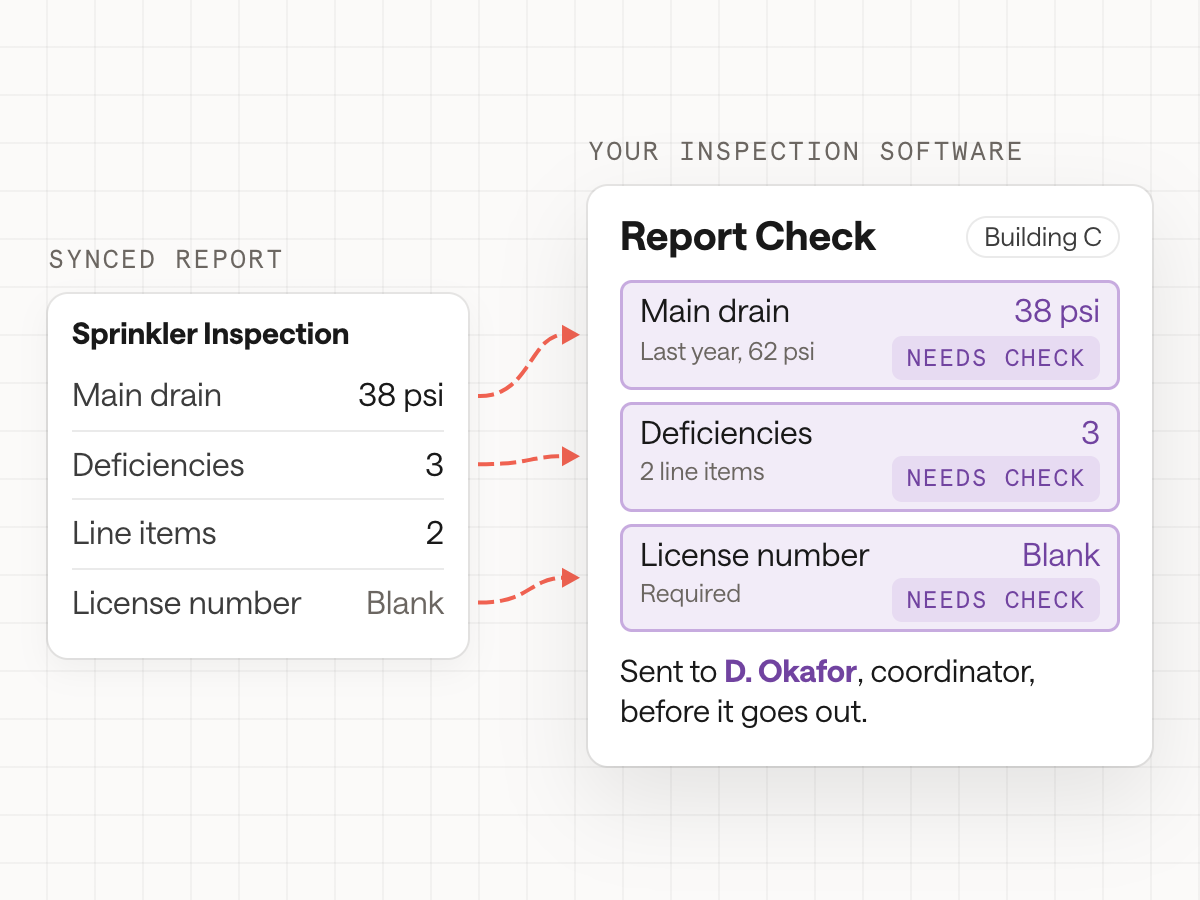
Pre-Submission Report Checks
Catch the rejected report before the AHJ does.
An inspector finishes an annual inspection and syncs the fire sprinkler inspection report. Before it goes to the jurisdiction’s portal, a coordinator reads it: main drain readings recorded, the deficiency count matching the line items, the right form for this jurisdiction, and the technician’s license number present. Anything missed comes back rejected days later.
We build fire inspection report checks that run on every report and compare readings with the building’s own history, so a main drain reading far off last year’s gets a second look. The coordinator sees only the flagged reports and still decides what gets submitted.
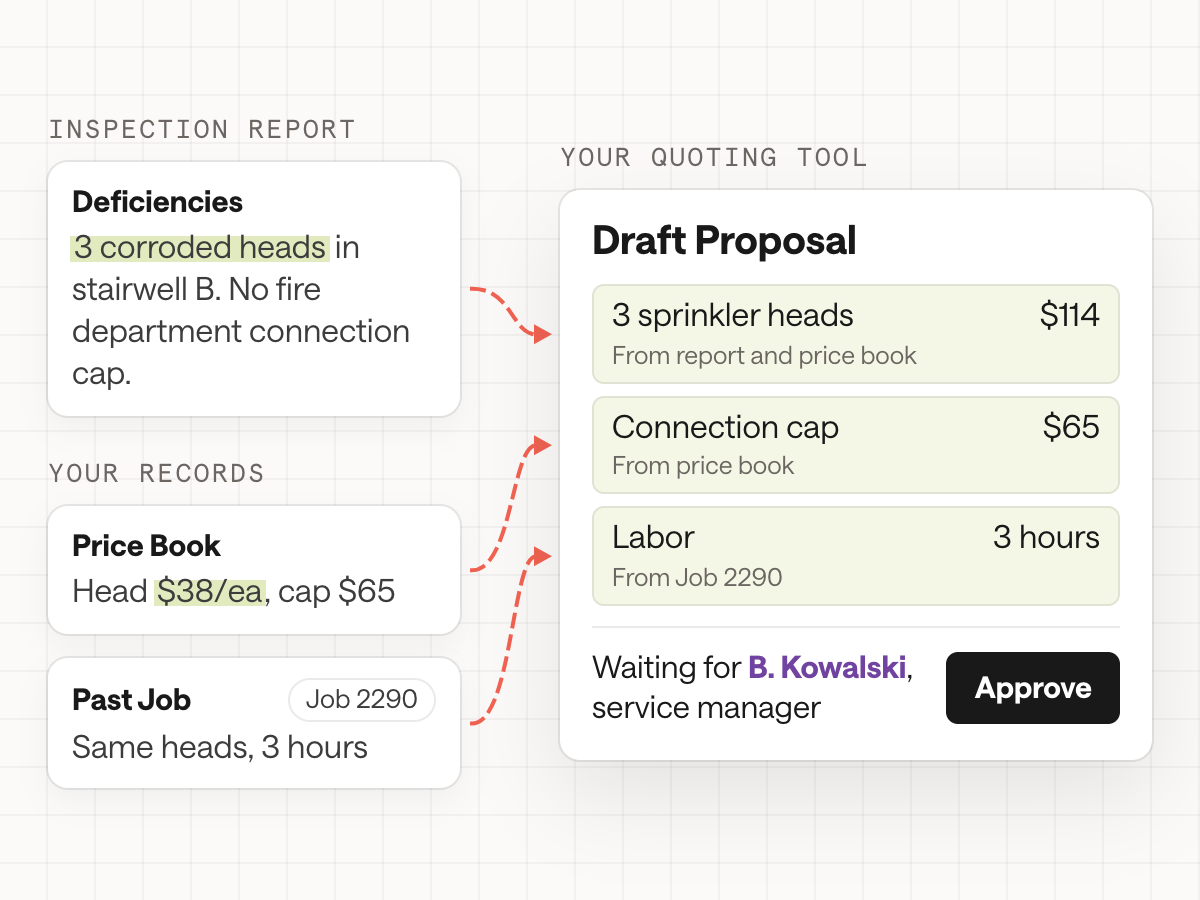
Deficiencies to Proposals
Turn deficiencies into quotes while the inspection is still fresh.
The report lists three corroded pendent heads in stairwell B and a missing FDC cap. A service manager reads it, looks up parts and labor, builds a proposal in the quoting or accounting tool, emails the property manager, and sets a reminder to follow up. In a busy month, some deficiencies never become proposals at all.
We build deficiency proposal drafting from the deficiency lines, the photos, your price book, and similar past jobs, grouped by building and system. The service manager checks scope and price, then sends it, and an accepted proposal becomes a work order with the lines carried over.
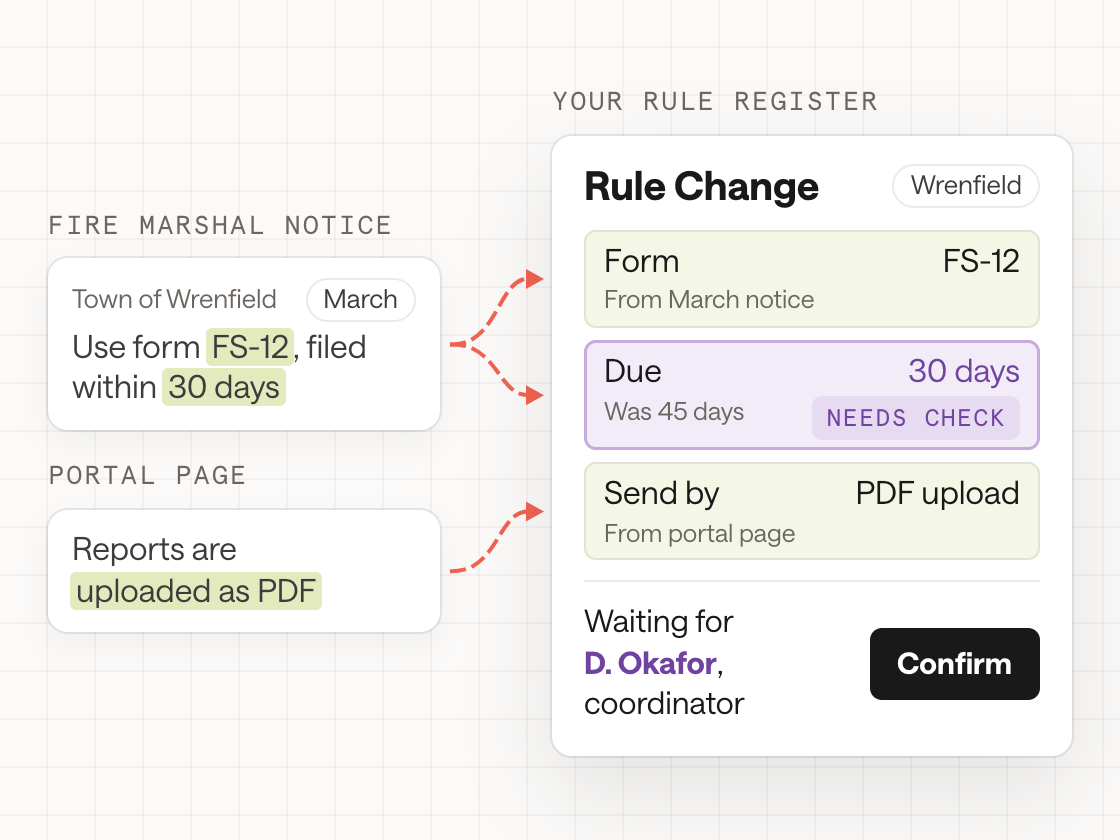
Jurisdiction Rules
Which form does this town want, and when is it due?
Every AHJ has its own portal or inbox, fee, due window, form, and adopted code edition. Your office tracks them in a spreadsheet and in the memory of the coordinator who has been there longest. When a fire marshal’s office changes its process, your team usually finds out from a rejection.
We build a rule register for every jurisdiction you serve, with each rule tied to its source: the notice, the portal page, or the adopted ordinance. Reports and schedules check against it, and a change gets flagged for someone on your team to confirm before it’s used.
Inspection software
What fire protection inspection software leaves to the office
Fire protection contractors already have fire protection software for inspections and service. We build the layer that connects field and office, office and AHJ, inspections and repair revenue, and the companies a growing business has bought.
Report Checks Before AHJ Submission
Every report is checked against the jurisdiction’s requirements, your own standards, and the building’s history before upload. Only reports with a missing reading, a mismatched count, or an unusual value reach a coordinator, with the reason attached.
Deficiency-to-Proposal Drafting
Deficiencies become drafted repair proposals, built from your price book, past jobs, and the photos from the inspection. Service managers review scope and price, then send. Accepted proposals move to scheduling and invoicing, and open deficiencies with no proposal show up on one list.
Jurisdiction Rule Tracking
One register of what each AHJ requires, including forms, fees, due windows, portals, and adopted editions, each tied to its source. When a jurisdiction changes something, the change is flagged for your team to confirm instead of being discovered through a rejected report.
Data Cleanup After Acquisitions
Two companies rarely describe the same building, riser, or panel the same way. We map acquired customers, sites, assets, and inspection histories into one model, flag duplicates and conflicts for a person to resolve, and keep the history your techs need at the next inspection.
Paper and Legacy Report Capture
Acquired branches and long-time customers often come with paper: handwritten extinguisher reports, scanned alarm test sheets, and binders of past deficiencies. A photo or scan becomes structured data attached to the right building and system, so the history doesn’t start over next visit.
Customer Requests and Inspection History
Property managers and insurers ask for last year’s fire alarm inspection report, the open deficiencies, or proof of a repair. An agent finds the answer in your inspection records, drafts the reply with the documents attached, and a person on your team approves what goes out.







How we work with fire protection contractors
We start with how a report travels after the tech leaves the building. If it helps, you send a handful of past reports, a rejected submission, and your jurisdiction spreadsheet. Then we watch your coordinator review reports, your service manager build a proposal, and your office absorb an acquired company’s customer list.
Then we think it through: which steps software should check, which need a person, and what to build first. We build a prototype on sample data, often last month’s reports, so your team can see what it would have caught. Once you approve it, we connect it to your inspection platform and accounting system and go live. We work within and around whatever you run, including ServiceTrade, BuildingReports, and Sage Intacct.
Records & control
Faster reports still have to stand up to the AHJ.
An inspection report is a record that a building owner, an insurer, and an AHJ may all rely on. Anything we build has to make those reports more complete and easier to stand behind, while every finding stays with the qualified person who made it.
Findings stay with the inspector
Software checks reports for missing readings, mismatches, and unusual values. It never changes a result, adds a deficiency, or clears one. Your qualified technicians record the findings, your coordinators decide what gets submitted, and the report goes out under your company’s name.
Your inspection platform stays the record
We identify which system owns each record: inspections, assets, proposals, and invoices. Checks and drafts read from those sources and write back only through steps you approve, so there’s never a second, conflicting inspection history sitting beside the one your techs and customers already rely on.
Every rule has a source
A flag that says "this AHJ requires a different form" links to the notice or portal page it came from, with its date. When the source is unclear, the system says so and sends the question to a person on your team to settle.
A permanent record of who signed off
Inspection and repair records can be traced with a permanent record system: who did what, when, and who signed off, from the deficiency to the completed repair. Your team decides what goes into that record and who is allowed to see it.
Fire protection inspection is driven by adopted fire and building codes, NFPA standards, and local or state AHJs, and requirements vary by system type and jurisdiction. We treat that as context for design: we don’t interpret codes or decide what a jurisdiction requires. What we build supports work that your licensed technicians and office staff own, and those decisions stay with them.
FAQ
Fire inspection report software: common questions
What is an AHJ in fire protection?
AHJ stands for authority having jurisdiction: the office, often a fire marshal or building department, responsible for enforcing fire codes in a given area. Many AHJs require inspection reports to be submitted through their own portal or a third-party reporting service, each with its own forms, fees, and deadlines.
Why do AHJs reject fire inspection reports?
Common reasons include missing readings, a deficiency count that doesn’t match the line items, the wrong form for that jurisdiction, a missing technician license number, and late submission. Checking every report against those rules before upload catches most of them before the AHJ does.
Do we have to replace our fire inspection software?
No. Your inspection platform keeps doing what it does well: checklists, photos, and scheduling. We build around it: we read finished reports to check them, draft proposals, and keep jurisdiction rules in one place.
Which NFPA standards do inspection reports follow?
It depends on the system: NFPA 25 covers water-based systems such as sprinklers, NFPA 72 covers fire alarms, and NFPA 10 covers portable extinguishers, among others. Each AHJ adopts specific editions. We don’t interpret codes; we check reports against the forms and readings your AHJs and your team define.
How can deficiencies turn into repair proposals faster?
By drafting the proposal straight from the inspection: the deficiency lines, the photos, your price book, and similar past jobs. Your service manager reviews scope and price instead of building the quote from scratch, and nothing slips through in a busy month.
Can you clean up data after we acquire another fire protection company?
Yes. We map the acquired company’s customers, buildings, systems, and inspection history into your model, flag duplicates and conflicts for a person to resolve, and capture paper records so next year’s inspection starts with the full history.
Does AI change inspection results?
No. AI checks reports for gaps and inconsistencies and drafts the paperwork around them. Findings, deficiencies, and pass or fail results are recorded by your qualified technicians and stay exactly as they wrote them.
You know AI could help. Let’s build it.
Bring us a task you have in mind, or just a hunch. We’ll help you find the right place to start and build it around the way your business works.