
AI + Custom Software for Aviation MRO
Aircraft records you can find without opening a binder.
8130-3 tags in binders, signed task cards in folders, logbook entries on paper, and a work package an inspector pages through card by card. Most repair stations run capable MRO software and still lose hours every week to the paper around it.
For repair stations, we build aircraft records management around the system you already run: paper turned into searchable data, work packages checked before they reach the inspector, and manuals searched with the source cited.
Your technicians and inspectors keep every signature. AI never signs.

Common repair station problems
Common AI and automation opportunities in aviation MRO
The aircraft work is skilled and certificated. Much of the time around it goes to finding paper, checking paper, and re-keying what the paper says.
8130-3 Tags, Task Cards, and Logbooks
Aircraft maintenance records shouldn't live in a binder.
The tag exists. It’s in a binder, a scan folder, or a vendor email, filed under a PO number nobody remembers. Every 8130-3 form, EASA Form 1, and certificate of conformance is a page someone finds by hand, and aircraft parts documentation is only as good as the filing behind it.
We build aircraft records management software and digital aircraft logbook capture: a phone photo or scan of a tag, task card, or logbook page becomes searchable data linked to the right part, serial, and work order. The original stays where your records procedures say, and acceptance stays with the receiving inspector.
Work-Package Review
Software finds the missing stamps so inspectors can inspect.
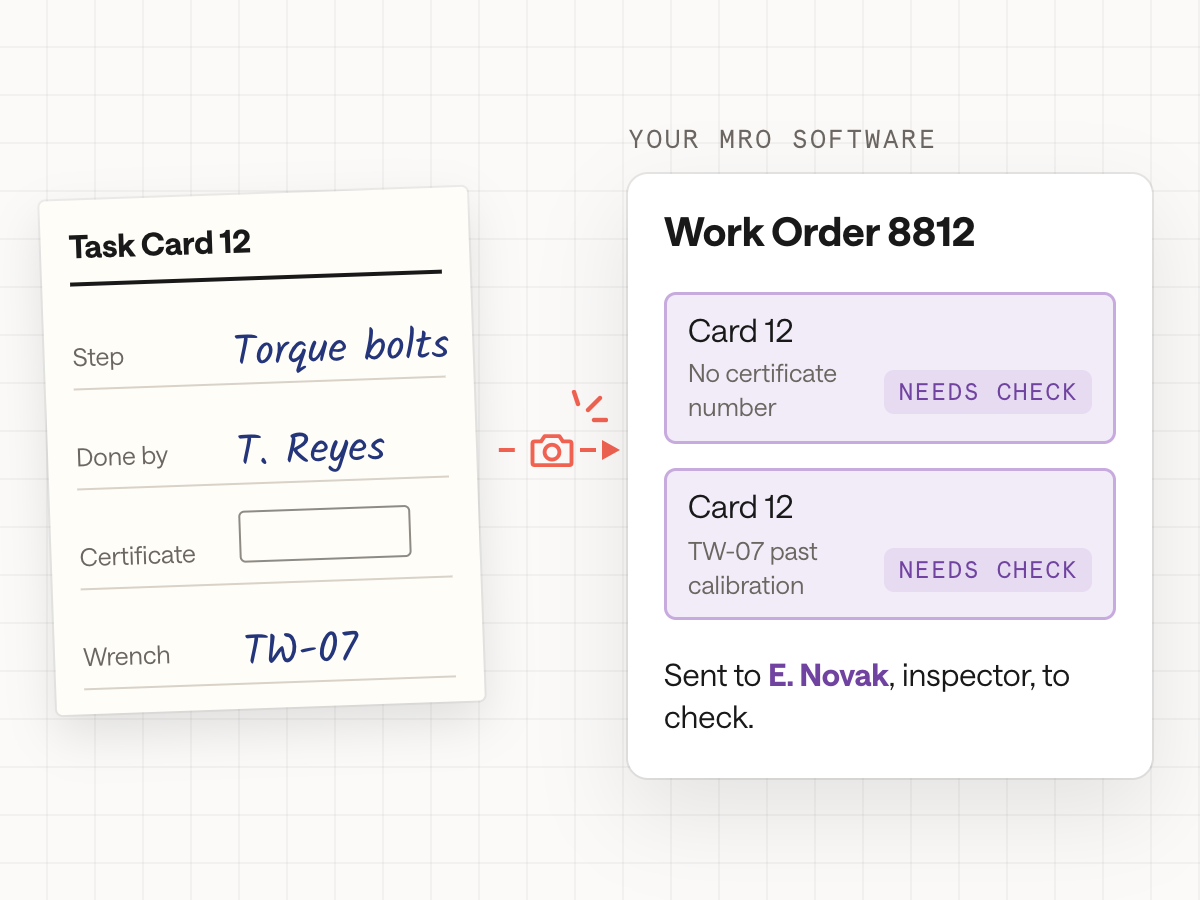
Before final inspection, an inspector pages through every task card: initials and certificate number on each step, the torque wrench ID against its calibration due date, every discrepancy closed and every installed part matched to its tag. Most of that time goes to checking paperwork.
We build work-package checks that read the package, from your aviation MRO software or a scan, and run the same checks first. The inspector gets a short list, such as "check cards 12, 19, and 31", with the source behind each flag. The inspection and the signature stay with your certificated people.
Manuals, ADs, and Service Bulletins
Which revision is current, and which ADs apply to this serial?
A planner builds a work order with three windows open: the manufacturer’s portal for the latest component maintenance manual, the FAA’s AD listings filtered by make and model, and a folder of service bulletins that may or may not apply to this serial range.
We build source-cited search across the maintenance data you’re licensed to use and your own manuals. It drafts applicability notes with the passage behind each one and flags a task card that cites a superseded revision. The planner and inspector decide what applies.
MRO software
Where AI in MRO actually fits
Most repair stations already run aircraft MRO software and repair station software. What’s missing is agreement between that system and the binder, the inbox, the manuals, and the accounting software. That’s where AI in aviation maintenance helps today: reading, checking, and finding, with every signature left to your certificated people.
Aircraft Records Management Software That Works With Your MRO System
Tags, certificates, task cards, and logbook entries captured from paper and linked to the work order, part, and serial in the system you already run. It’s aviation document management software for the paper that never reached the MRO system, and an electronic logbook aviation inspectors can search.
Receiving and Parts Documents
At receiving, each FAA Form 8130-3, EASA Form 1, and vendor certificate is read and matched to the PO, part number, and dash number. Mismatches get flagged for the receiving inspector, and every 8130 tag stays linked to its part for the next person who asks for it.
Work-Package Review Before Sign-off
Checks every task card, tool, part, and reference in a package before an inspector sees it, and returns only the steps that need a second look. It can run on closed packages too, so you can see what it would have caught. The inspector still performs the inspection and makes the call.
Manuals, ADs, and Service Bulletin Search
Ask in plain language and get the passage, document, and revision behind the answer. Search covers licensed maintenance data, AD and SB libraries, your repair station manual, your capabilities list, and past work orders, scoped to what each person is allowed to see.
Quotes, QuickBooks, and Accounting
Shops that run QuickBooks beside their MRO software re-key parts sales, labor, and invoices between them. We connect the two and watch the sync. The same approach can draft a quote from an incoming RFQ, which is most of what shops want from MRO quoting software or aviation quoting software.
Tool Calibration, Training, and Audit Evidence
Calibration due dates, technician qualifications, and recurrent training sit in spreadsheets that rarely meet the work order. We connect them, so a task card citing an out-of-calibration torque wrench gets flagged, and the evidence an auditor asks for is gathered while the work happens.



How we work with repair stations
We start where the hours go. If it helps, you send a few closed work packages, a redacted capabilities list, and the spreadsheet that sits beside your MRO software. Then we watch: an inspector reviewing a package, receiving checking in a part, a planner building a work order. After that comes the Think It First step: sorting each step into what software should check, what needs a person, and what to build first.
Next comes a prototype on sample data, such as last quarter’s closed packages, so your inspectors can see what it would have flagged. When you approve it, we connect it to your MRO software and accounting system and go live. That software, CORRIDOR, Traxxall, or EBIS, stays in charge because we work within and around it.
Signatures & control
Automation still has to respect who signs for the aircraft.
A repair station’s records exist so someone can reconstruct who did what, to which part, with which data, and which tools. Anything we build has to make that history easier to prove, and every signature stays with the person who holds the certificate.
Your maintenance system stays the record
We identify which system owns each record: work orders, inventory, training, accounting. New checks and searches read from those sources and write back only through steps you approve, instead of creating a second, conflicting copy of the truth.
People sign, and AI never does
Software reads, extracts, compares, and flags. Technicians, inspectors, and the people your repair station manual authorizes make every maintenance, inspection, and return-to-service decision, and apply every signature, electronic or ink. Software never marks a step complete.
Every flag shows its source
A flag that says "tool past calibration" links to the calibration record. An answer about an AD links to the passage it came from. When the sources don’t support an answer, the system hands the question to a person.
Built around your manuals
We design around your repair station and quality control manuals and the records your inspectors and auditors ask for, so the full history of a part or a task is a search instead of a morning in the records room.
Part 145 governs certificated repair stations, and Part 43 governs maintenance records and return-to-service work. FAA Advisory Circular 120-78B gives guidance on electronic signatures, electronic recordkeeping, and electronic manuals. We treat all of it as context for design. What we build supports the work your quality team and accountable manager still own. Before we promise a production system, an aviation maintenance specialist, such as a Part 145 quality professional or an A&P mechanic with inspection authorization, joins the work.
FAQ
Aircraft records management: common questions
Is this aviation MRO software?
It sits beside your MRO software, which keeps the work orders, task cards, and inventory. We build the layer around it: paper records into data, work packages checked before an inspector sees them, and cited search across your manuals. It reads from your system and writes back only through steps you approve.
What is an 8130 tag?
An 8130 tag is the common name for FAA Form 8130-3, the Authorized Release Certificate that travels with a part after manufacture, repair, or overhaul. Its European counterpart is EASA Form 1. Receiving inspectors check each tag against the part and the purchase order, and the tag stays part of that part’s history for as long as it’s in service.
How do you digitize aircraft logbooks?
How to digitize aircraft logbooks: start with the entries you search most often. Each page is photographed or scanned, and the entry, date, aircraft, task, and signature block are read into structured data linked to the right aircraft and work order. The paper originals stay where your records procedures keep them. Aircraft logbook software built this way adds search, and the signatures and the record stay where they are.
Can aircraft parts traceability work across the systems we already use?
It can. Aircraft parts traceability usually breaks because a part’s history is split between the tag in a binder, the PO in accounting, the receiving record in inventory, and the work orders in your MRO software. Aerospace traceability software built across those systems can link each serial to its records and flag what doesn’t line up.
What can aviation AI do in a repair station?
Most useful aviation AI in a repair station today reads and checks rather than decides. It turns tags and task cards into data, checks a work package for missing initials or an out-of-calibration tool, finds the current manual revision, and drafts quotes. MRO AI should never sign anything: technicians and inspectors make every maintenance and return-to-service decision.
Will this replace our aircraft maintenance records software?
No. If your records live in an MRO system, with a records provider, or on paper, they stay there. We read from them and link what’s scattered: tags, certificates, task cards, invoices. Nothing moves away from the system your repair station manual names as the record, and nothing is signed by software.
Can AI in aviation maintenance check a work package before final inspection?
It can. A work-package check can read the package, from your MRO system or a scan, and run the paperwork checks first: initials and certificate numbers on each step, tool IDs against calibration due dates, discrepancies closed, and installed parts matched to their tags. The inspector gets a short list of cards to look at, with the source behind each flag. The inspection and the signature stay with your certificated people.
You know AI could help. Let’s build it.
Bring us a task you have in mind, or just a hunch. We’ll help you find the right place to start and build it around the way your business works.